Apr 26, 2012

Ruby for the C# developer–Open Classes & method_missing

In the last post we covered the basics of the Ruby language from a C# developers perspective. We left off with a short discussion about one major fundamental difference between Ruby and C#: Mutable Types

In this post I wanted to cover the subject in a bit more depth and explain what Open classes are and what the method_missing method is used for.

Open classes means you can change the definition of any class at any time. Usually this would be done to add behavior to a class. Notice I am saying class here not object. In the classic cookie and cookie cutter example you think of a class as the cookie cutter and the object as the cookie (the instance that the cookie cutter just stamped out). Now you can see why this idea is very foreign to a C# developer. It means classes can be extending at any time. This sounds a bit like extension methods but you will see as we dig deeper that there is more to it in Ruby.

Let’s first look at an example in Ruby:

class String
def blank?
self.size == 0
end
end


This is adding the method named “blank” which returns a boolean to the String class in Ruby. Now that is almost exactly like an extension method. We could get the same behavior in C# like this:


public static class StringExtensions
{
public static Boolean Blank(this string value)
{
return String.IsNullOrEmpty(value);
}
}


But there is another way to add behavior to a class in Ruby. This is via the method_missing method. Since all method calls in Ruby are really just messages there is a chance that a particular object won’t be able to handle the message it is given. In these cases Ruby will call a special “debugging method” if it cannot find a method with the specified name.


What does this mean for you? It means that you have a hook to handle any unknown method that gets called on your object at runtime. This is really cool but may not be totally clear without an example. The 7 Languages in 7 weeks book does about the best example I could think of so I will shamelessly steal that one to illustrate the point.


class Roman
def self.method_missing name, *args
roman = name.to_s
roman.gsub("IV","IIII")
roman.gsub("IX","VIIII")
roman.gsub("XL","XXXX")
roman.gsub("XC","LXXXX")

(roman.count("I") +
roman.count("V") * 5 +
roman.count("X") * 10 +
roman.count("L") * 50 +
roman.count("C") * 100)
end
end


Ok so what the heck is this thing doing? First it is defining the method_missing method on a class called Roman. It is then doing logic in the method_missing method to handle the name of the method that the user tried to call. Let’s look at what the call site would look like


puts Roman.X
puts Roman.XC


Now maybe it makes more sense. You can see someone tried to call a method named “X” on the Roman class. Instead of defining each permutation of possible Romans numerals as their own method we can simple catch the method_missing method and then do string based logic to figure out the method name and convert that to the correct integer value. Make sense? This is a core feature of Ruby and a very valuable concept to understand.


This is part of a larger series of posts inspired by the 7 languages in 7 weeks book. Use the7LangIn7Weeks tag to find the other related posts

Labels: , ,

Apr 4, 2012

Ruby for the C# developer–The Basics

I have been reading 7 languages in 7 weeks recently and I decided to to start a series of posts that focusing on learning the languages discussed in the book from the point of view of a C# / .NET developer.

So let’s get started. First we are going to start with Ruby. This is the one language in the book that I already had some familiarity with. I have read Design Patterns in Ruby by Russ Olsen and The Well Grounded Rubyist by David A Black. Both are really good books that focus more on the Ruby the language and less on Ruby in the context of Rails.

So let’s talk about the basics of the Ruby language.

Type System

Ruby has a strong dynamic type system. This means a few things

  1. You will receive an error if types collide. (This is the “strong” part)
  2. You will get this error at runtime not at compile time (This is the “dynamic” part)

Let’s look at some code examples of this. First C#

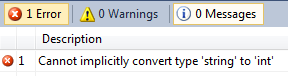
int foo = 10 + "bar";

In C# this results in a compile time error:


Now the same thing in Ruby


foo = 10 + “bar”

Since Ruby does type checking at runtime this will not cause any errors until you try to call it. Then you will receive the following error (also notice the lack of type information to the left of foo):


Classes


Ruby is an object oriented language with a single inheritance model like C#.


Let’s define a class in each language. First C#


public class Foo
{
public int Bar { get; set; }
public Foo()
{
Bar = 10;
}
}

This is a simple C# class that defines one public read / write property called Bar and has a constructor that sets Bar = 10. And now the same thing in Ruby


class Foo
attr_accessor :bar

def initialize()
@bar = 10
end
end

This is the same as the C# class above. The initialize method is the constructor for this class. The attr_accessor keyword defines a read / write property called bar (as opposed to att_reader which is a read only property). In the initialize method you see we reference the bar variable with an @ sign. This is the syntax for referencing instance variables in Ruby.


Interfaces vs Modules


Both Ruby and C# are single inheritance languages. To propagate non-similar behaviors to classes C# uses Interfaces whereas Ruby uses “mixin’s” via the module keyword.


Let’s first look at an Interface in C#


public interface IBaz
{
void DoSomething();
}

Here we define an interface called IBaz that defines one method DoSomething(). If we want to make sure our Foo class implements this “behavior” in C# we make Foo implement IBaz. This ensures that our object satisfies the IBaz contract (meaning we can call DoSomething() on an instance of foo)


public class Foo: IBaz
{
public int Bar { get; set; }
public Foo()
{
Bar = 10;
}

public void DoSomething()
{
//elided
}
}

Now lets look at how this is done in Ruby via “mixin’s”. First lets define our “mixin”


module IBaz
def do_something
#elided
end
end

Notice the subtle difference here? In the C# version we were simply defining a contract which our class must implement itself. In Ruby the implementation actually lives in the module (I named the module IBaz to keep with the C# example but that isn’t a Ruby naming convention).


And then to make sure our Ruby class can call the IBaz DoSomething we need to “include” it like this:


class Foo
include IBaz
attr_accessor :bar

def initialize()
@bar = 10
end
end

There is a key fundamental concept happening here. Modules can implement behaviors directly in Ruby. This means that a given type doesn’t implement “included” behaviors natively.


Duck Typing and Mutable Types


This is simply a fundamental difference between C# and Ruby. Many thanks to Arne for working through these thoughts with me.


Types in Ruby are mutable, even at runtime. This means that method dispatch cannot be resolved at compile time. This means that method dispatch is resolved at call time.


Call time method dispatch might sound similar to how the dynamic keyword works in C#. However, in Ruby there is a difference to be aware of.


The “method call” is simply a message that is sent to a given type instance. That message is then sent up the type hierarchy to see if there is any thing that can handle the message. This process involves looking at native methods on the type, “included” methods from mixins and checking the method_missing method.


In C# by using the dynamic type you can get past compile time checking of method call sites. However, at runtime if the object doesn’t contain the called method in it’s inheritance hierarchy the call will fail. In Ruby there is a language construct called method_missing that allows you to hook an unknown method call and do something with it.


This is where we will pick up in the next post. Open classes and the method_missing method


This is part of a larger series of posts inspired by the 7 languages in 7 weeks book. Use the 7LangIn7Weeks tag to find the other related posts

Labels: , ,

Apr 30, 2010

5 Things you should be doing in your code but probably aren’t

This blog post is long overdue since I did the leg work for it months ago. I did a little experiment with my coworkers effectively crowd sourcing the information gathering step and I am finally distilling my findings.

At InterKnowlogy, the nature of our work changes rapidly. We are effectively a collection of custom software consultants. This means we get exposed to various different technologies, methodologies, and coding styles. Our projects range in duration from short term (4-5 weeks) to very long term (1-2 years or more). Across all these different projects I wanted to find common patterns that appear in the code. I was looking for things that could easily be changed to increase clarity, performance, and maintainability.

While the science of my approach could be debated endlessly let me preface this with “it is only a first pass.” Very simply, I asked my colleagues to take the project they were currently working on and run the built in Visual Studio code analysis tool. I asked them to send me the top one or two Code Analysis warnings that showed up most often. In some cases people ran this across multiple projects within a solution and in some cases they just ran it on the largest or most complex project in the solution. From this decidedly unscientific study I have found five common warnings that showed up consistently across projects.

All of these are simple fixes and generally acceptable, low impact fixes that would only increase clarity, robustness, or performance of your code. Now, that doesn’t mean you should blindly implement these suggestions without considering the impact of them. However, you likely have these “errors” in your codebase right now and might benefit from implementing these fixes.

1. CA1823Avoid Unused private fields

This one is easy to spot using a tool like ReSharper (R# for short). R# will gray out fields that aren’t being used anywhere (it will do the same for local variables and methods). In our case some people here are not R# fans so they don’t get this visual cue. Often times this is the result a refactoring. You will change some code in a method and the private field you were using is obsolete now but you never go back and clean up the field definition. This is a simple fix and won’t negatively affect anything. Of course it also doesn’t really hurt anything to not remove the fields but in a very large project it can help increase code clarity and reduce the work the compiler has to do to optimize away the unused fields at compile time

2. CA1305Specify IFormatProvider

This one is something I have become accustomed to doing just out of force of habit. If you call a method that has an override that accepts an IFormatProvider and don’t explicitly specify the IFormatProvider or the CultureInfo you will get this warning. Most often I see this in String.Format, String.Compare, and DateTime.Parse calls. The MSDN help has a very succinct explanation of how to deal with this error (emphasis mine):

.NET Framework members choose default culture and formatting based on assumptions that might not be correct for your code. To ensure the code works as expected for your scenarios, you should supply culture-specific information according to the following guidelines:

  • If the value will be displayed to the user, use the current culture. See CultureInfo.CurrentCulture.

  • If the value will be stored and accessed by software (persisted to a file or database), use the invariant culture. See CultureInfo.InvariantCulture.

  • If you do not know the destination of the value, have the data consumer or provider specify the culture.

Even if the default behavior of the overloaded member is appropriate for your needs, it is better to explicitly call the culture-specific overload so that your code is self-documenting and more easily maintained.

3. CA1709 & CA1704 Identifiers should be cased correctly & Identifiers should be spelled correctly

This is probably the main reason I started running CodeAnalysis consistently on my projects. I am notoriously a terrible speller and typo king (if you suffer through my blog I am sure you have noticed). CodeAnalysis does a good job detecting spelling errors in identifiers and can help you increase your code clarity and ensure you are exposing public API members with proper spelling and casing (I violated my own rule and forgot to run it on Courier and got busted as soon as someone used it and noticed on the of the public methods was misspelled). The MSDN link I provided explains how the spell checking is accomplished and how it breaks identifiers apart into logical words.

The argument on proper casing is more controversial so I will leave it up to you if you want to listen to what Code Analysis has to say about that. Is “id” or “Id” or “ID” ? (For the record it is “Id” according to Code Analysis)

4. CA1062Validate arguments of public methods

I am surprised by how often I see this one. Plain and simple, straight from MSDN: “All reference arguments that are passed to externally visible methods should be checked against null.”  Again, R# to the rescue here. It very clearly points out when you should be checking for null and gives a quick key stroke to implement the boiler plate code for you. Do you see a pattern here? R# gives you better programming habits. If you are passing in a reference argument put in a null check before you do anything else. How many times have you gotten a NullReferenceException at runtime? About a billion times and a good portion of those could be prevented by simply getting in the habit of null checking reference arguments. From MSDN:

// This method violates the rule.
public void DoNotValidate(string input)
{
if (input.Length != 0)
{
Console.WriteLine(input);
}
}

// This method satisfies the rule.
public void Validate(string input)
{
if (input == null)
{
throw new ArgumentNullException("input");
}
if (input.Length != 0)
{
Console.WriteLine(input);
}
}


5. CA1805Do not initialize unnecessarily


This one is mostly a pet peeve of mine. Again R# to the rescue here. It will simply gray out redundant initialization code. Often times, when I see redundant initialization it points out to me a fundamental misunderstanding  of how the CLR works. Again, from MSDN:


The common language runtime initializes all fields to their default values before running the constructor. In most cases, initializing a field to its default value in a constructor is redundant


If you are declaring private fields there is no need to initialize them (either in line or in the constructor) if you are just setting them to their default value. This just adds code bloat and the compiler will optimize this away anyways. To be sure you know what your fields default value is you can use the handy Default Values Table from MSDN.


Again, most of these issues are minor and won’t cause you grief if you don’t fix them (although CA1305 has the potential to cause some nasty issues). However, if you get in the habit of at least considering these issues and writing the code the “correct” way from the start you will reduce the overall noise in your code and increase the overall “correctness” of your codebase. Also, if you do intend to run Code Analysis on your project, fixing these five issues first will greatly reduce the number of warnings you see (at least according to my highly unscientific study).


If you didn’t notice the other pattern that emerged here it is that I am a fan of R#. It proactively helps you fix these types of issues at the time you write the code. For me, R# makes me a better programmer and helps instill better habits. Without sounding like too much of a shill for R# (too late?) I highly recommend at least trying it out and seeing if you like it. It took me about 8 months of using it before I finally “saw the light.” Now that I have I can’t live without it.


*Full Disclosure: As a Microsoft MVP JetBrains does provide me with complimentary licenses of their software, including R#. I have been using R# prior to being awarded MVP and my experience has been consistently solid throughout.

Labels: , , ,

Apr 3, 2010

MediaRss libraries now on codeplex

I have just published a new Codeplex project: http://mediarss.codeplex.com/. This project has grown out of a larger effort I am currently working on. I had a need to read and write MediaRss files. If you aren’t familiar with the MediaRss spec it is an RSS spec originally developed by Yahoo for their video search engine. It has since been adopted by the wider community and is becoming more standardized. For details on the spec itself see here and here.

For what I am working on this format worked well for me. However, there wasn’t much out there in the way of C# libraries that did any of the heavy lifting for me. In general parsing RSS is trivial in .NET but there are a few oddities about this spec that lead me down the path of building my own library. It took a little tedious work to complete but now it as at point where it is useful to me and I felt it could be valuable to others looking for a quick solution to dealing with MediaRss files.

I leveraged the SyndicationFeed object model from .NET 3.5 to make consuming the feed feel natural to those already familiar with this model. The usage looks like this

var reader = XmlReader.Create("SampleMedia.rss");
var feed = SyndicationFeed.Load<MediaRssFeed>(reader);


What you get back is a strongly typed MediaRssFeed object. You can then treat it like you would any other SyndicationFeed object. I have also included an extension method to easily cast the Items property of the MediaRssFeed to the MediaRssItem object. To do that you would do:


var feed = SyndicationFeed.Load<MediaRssFeed>(reader);
IEnumerable<MediaRssItem> feedItems = feed.Items.AsMediaRssItems();


This lets you dive into all the properties on the items that are specific to the MediaRss spec. I still have a little more work to do to fully support the spec but it is most of the way there. The unit test project is best the place to see the samples of how to read and write using the library and how to inspect the different properties of the object. You can get the compiled binaries and / or the full source code from here. Enjoy.

Labels: , ,

Dec 21, 2009

Decoupled ViewModel Messaging (Part 3)

NOTE: All the code shown in this series has been published to codeplex. If you would like to download the framework or the sample application that uses the framework you can find it here: http://courier.codeplex.com/

    In this part of our saga we find or intrepid hero trapped in a ……. Wait where was I? So far in this series we have covered decoupled messaging between ViewModels at a high level and we have looked at one specific enhancement that I have added to my courier framework that is lacking in other implementations.

     In this final post I am going to cover one more feature that I have added to the courier framework that I think provides a very nice addition to the overall process of decoupled ViewModel messaging and that is message caching.

    When I first started with this framework I really just set out to wrap my head around what others had done (CoreMVVM,Cinch, Prism, MVVM Foundation). Once I had gotten to that point I wanted to add a little something more to make the framework my own. What I found was that, in my scenarios, I found myself needing to cache messages for later retrieval. 

    The most obvious case for this is in the “Wizard” type scenario. When a user is performing a sequential set of actions I often have the need to pass data from one screen to the next. In this scenario the next screen is not created until after the previous screen is destroyed. This means that the message broadcast from screen one would happen before screen two is around to listen for it. With me so far?

    So, to solve this problem I figured I would implement some sort of caching mechanism that would allow me to:

  • Broadcast a message from View one
  • Save the message for re-broadcast
  • Destroy View one
  • Create View two
  • Register for that message from View two
  • Receive any, valid, cached copies of the message I registered for

The first thing I did was to implement an internal List<T> inside the mediator class that would store these CachedMessage objects. When a message is broadcast with caching options I will save a copy of the message to this List<T>. Any subsequent registrations for this message will receive any valid cached copies of the messages.

    So I added the following to the mediator

private readonly List<CachedMessage> cachedMessages = new List<CachedMessage>();


Where the CachedMessage class is defined like this:


[DebuggerDisplay("Message: {Message}, Parameter: {Parameter}")]
internal class CachedMessage
{
public String Message { get; private set; }
public Object Parameter { get; private set; }
public CacheSettings CacheOptions { get; private set;}
public Int32 ResendCount { get; set; }

public CachedMessage(String message, Object parameter)
{
Message = message;
Parameter = parameter;
}

public CachedMessage(String message, Object parameter, CacheSettings cacheOptions)
{
CacheOptions = cacheOptions;
Message = message;
Parameter = parameter;
}
}


    Two things to note here. First the CachedMessage class has a public property of type CacheSettings. This gives us the details of how long to keep the message for. Currently I am supporting two types of caching, time based and recurrence based. This means you can specify a specific DateTime when the message will expire or you can specify how many re-broadcasts before the message expires. The CacheSettings class looks like this:


[DebuggerDisplay("Expiration Date: {ExpirationDate}, NumberOfResends: {NumberOfResends}")]
public class CacheSettings
{
public DateTime ExpirationDate { get; private set; }
public Int32 NumberOfResends { get; private set; }

public CacheSettings(DateTime expiration)
{
ExpirationDate = expiration;
NumberOfResends = Int32.MaxValue;
}

public CacheSettings(Int32 timesToResend)
{
NumberOfResends = timesToResend;
ExpirationDate = DateTime.MaxValue;
}
}


    The second thing to note about both of these classes (CachedMessage and CacheSettings) is the use of the DebuggerDisplay attribute. I have just recently got in the habit of using this attribute religiously and I don’t know what I ever did without it. I won’t dive too in depth here about it, but suffice it to say, if you aren’t using it right now you should be. If you don’t know what it is stop reading here and jump over to my colleague, Adam Calderon’s, excellent post about it (don’t worry I will wait for you to come back).


    Ok, now that we are all writing Debugger friendly classes thanks to Adam, let’s wrap this post up with some usage scenarios. In the “Wizard” like case I talked about above I really just want to be able to broadcast a message and cache it for one re-broadcast. This allows me to broadcast the message from view one and then destroy view one and create view two. view two then registers for the message like it would normally and will immediately receive any messages that are in the cache. Once the message is dispatched from the cache we want to clean it out to prevent further re-broadcast. So first, two examples of how to call BroadcastMessage<T> with caching options


//NumberOfResend based caching example
Mediator.BroadcastMessage("Content1Message",messageContent,new CacheSettings(1));

//Time Based caching example
Mediator.BroadcastMessage("Content1Message", messageContent, new CacheSettings(DateTime.Now.Add(TimeSpan.FromSeconds(30))));


The first example show how to broadcast a message and specify that it should be cached for one re-broadcast. The second example shows how to broadcast a message and store it in the cache for 30 seconds after the first broadcast. Pretty straightforward so far. Now the two key methods in the Mediator class that handle keeping the cache clean and dispatching messages from cache:


private void GetMessagesFromCache(String message, Delegate callback)
{
CleanOutCache();
//Search the cache for matches messages
List<CachedMessage> matches = cachedMessages.FindAll(action => action.Message == message);
//If we find matches invoke the delegate passed in and pass the message payload
matches.ForEach(delegate(CachedMessage action)
{
callback.DynamicInvoke(action.Parameter);
action.ResendCount++;
});
}

private void CleanOutCache()
{
//Remove any expired messages from the cache
cachedMessages.RemoveAll(message => (message.CacheOptions.ExpirationDate < DateTime.Now) || (message.ResendCount >= message.CacheOptions.NumberOfResends));
}


    You can see in the GetMessagesFromCache method the first thing it does is clean out any expired messages from the cache. The CleanOutCache method uses the RemoveAll method on List<T> and an lambda to do a particularly elegant line of code. This code checks two properties of the CachedMessage objects (is it’s expiration date in the past OR has it been re-broadcast the max number of times?). If either is true it is removed from the CachedMessages list. A very succinct line of code for a normally cumbersome task.


    After the cache has been cleaned we call FindAll (again, using a simple lambda) to get all the messages from cache that match the one we are looking for (There could be multiple messages from different senders in the cache and we want to dispatch them all). Once we have the matching messages we invoke the callback that is registered and we increment the re-send count on the message. Overall, a pretty simple process, but it turns out to be very powerful.


    That wraps up this 3 part series ( I, II, III) on the Courier framework. As I add new features to the framework I will post specific updates about the features. If anyone else is interested in joining the codeplex project and adding their ideas to the framework please feel free to contact me through this blog.  


NOTE: All the code shown in this series has been published to codeplex. If you would like to download the framework or the sample application that uses the framework you can find it here: http://courier.codeplex.com/

Labels: , , , , ,

Dec 12, 2009

Decoupled ViewModel Messaging (Part 2)

NOTE: All the code shown in this series has been published to codeplex. If you would like to download the framework or the sample application that uses the framework you can find it here: http://courier.codeplex.com/

In my previous post I discussed the ViewModel messaging framework at a high level and went over the basics of the implementation. Most of this is review if you are familiar with the other frameworks that I borrowed ideas from.

In this post I want to touch on the two specific features I wanted to add to the other frameworks I had seen (hence the motivation behind this framework and this series of blog posts). Specifically, the two features I felt would be useful is the ability to explicitly unsubscribe from a particular message and the ability to cache messages for re-broadcast at a later date.

The first feature seems obvious enough. There are times when you want to listen for messages and there are times that you want to stop listening for that message. Many of the frameworks mentioned previously use WeakReferences to store the pointer to the message handler method. This works great when object are being destroyed. The Mediator object, which is responsible for delegating messages to their proper handlers, stores only a WeakReference to the handler and checks just prior to dispatching the message if the endpoint IsAlive. If it is then the message is dispatched. If it isn’t alive, then the endpoint is removed from the list of subscribers. This check looks something like this:

for (int i = weakSubscribers.Count - 1; i > -1; --i)
{
WeakSubscriber weakSubscriber = weakSubscribers[i];
if (!weakSubscriber.IsAlive)
weakSubscribers.RemoveAt(i);
else
subscribers.Add(weakSubscriber.CreateAction());
}


What this does is simple. It walks the collection of subscribers backwards and checks the IsAlive property. The IsAlive property on the WeakSubscriber class is simply looking at the underlying WeakReference.IsAlive property. If we find a dead subscriber we remove it from our list so that we don’t try to dispatch the message to an event handler method that has been destroyed.


This pattern works great is your subscriber objects, that is the object that has the event handler for the message in it, is being destroyed. However, I have situations where my object that contains the handler method for a message is still alive but I don’t want to receive any more messages of a given type from the mediator. In this case I need a way to tell the Mediator to remove from it’s list of subscribers.


To help with this I have added a method to the Messenger class call UnRegisterForMessage.


//Method bodies elided for clarity 
public void UnRegisterForMessage(String message, Delegate callback)
{
...
}


This method takes in the message you want to unsubscribe to and the handler you want to remove for that message. For a given message and object can have multiple handlers. This method allows you to unsubscribe a particular handler while, potentially keeping the other handlers subscribed.


On caveat to this approach is how I am passing the reference to the handler method. In the internal unregister process  I need a way to determine which handler I am removing from which message. The only way I could find to make this work was to pass a reference to the delegate itself. The remove method inside the MessageToSubscriberMap class looks like this:


internal void RemoveSubscriber(String message, Delegate callback)
{
lock (map)
{
if (map.ContainsKey(message))
{
map[message].RemoveAll(subscriber => subscriber.Method == callback.Method);
}
}
}


This works fine but the usage is a bit strange and has one glaring issue that I have yet to find a solution for. Let me demonstrate. I if I want to unsubscribe from a message called “UserChanged.” I would write something like this:


Mediator.UnRegisterForMessage("UserChanged", (Action<IUser>)OnUserChanged)


Notice the second parameter here. I am the reference to the delegate OnUserChanged and casting it as an action. This will work just fine. However, in some internal projects I have used this framework and noticed other developers do something like this:


Mediator.UnRegisterForMessage("UserChnaged", new Action<IUser>(OnUserChnaged))


Notice the difference? Subtle maybe, but it is critical to understand the problem here. In the second example the second parameter, instead of being cast as an Action<T> a new instance of an Action<T> is being created and passed in. This will not point to the same instance of the delegate passed in on the Register call. This means the unsubscribe will not find a match and will not remove the handler. This means you will continue to get messages broadcast. In general, I am not completely satisfied with the unsubscribe method signature and may change it in the future.


  This post is getting a bit long winded so I will stop here and in my next post I will describe message caching and how I went about implementing it.


NOTE: All the code shown in this series has been published to codeplex. If you would like to download the framework or the sample application that uses the framework you can find it here: http://courier.codeplex.com/

Labels: , , , ,

Nov 17, 2009

Decoupled ViewModel Messaging (Part 1)


NOTE: All the code shown in this series has been published to codeplex. If you would like to download the framework or the sample application that uses the framework you can find it here: http://courier.codeplex.com/

Lately I have been playing around with different ways to decouple the communication between ViewModels in the MVVM pattern. My focus has been in WPF, as this is what the MVVM pattern is suited for however, this messaging technique is not specific to WPF and could be used in any other decoupled solution (MVC, MVP etc..)

I poked around on the tubes looking for examples of how other people have solved this problem and there are many different options out there. My implementation borrows heavily from the CoreMVVM framework on codeplex which itself borrows bits from Cinch, Prism, MVVM Foundation etc.. 

My first goal was to really just get down in the weeds and understand how these other frameworks were handling decoupled messaging between objects. Once I wrapped my head around it I then came up with two features that I thought would be nice to have in a messaging solution that I hadn’t seen in other frameworks.

The ability to manually unsubscribe from messages and the ability cache messages for re-broadcast.

Before I dive in and talk about the new features I wanted to add let me go over the basic implementation of the Mediator pattern I did. Again, this is very similar to how the CoreMVVM framework does it, so if you are familiar with that framework this should review.

The basis of the implementation is a basic mediator pattern. You have a mediator object that stores a mapping of subscribers and messages. This gives the mediator enough information to understand what messages to dispatch to what subscribers. The mediator in my case looks like this 

//Method bodies elided for clarity
public class Mediator
{
private readonly MessageToSubscriberMap subscribers = new MessageToSubscriberMap();
private readonly List<CachedMessage> cachedMessages = new List<CachedMessage>();

public void RegisterForMessage(String message, Delegate callback)
{
...
}

public void UnRegisterForMessage(String message, Delegate callback)
{
...
}

public void BroadcastMessage<T>(String message, Boolean cacheMessage, T parameter)
{
...
}

public void BrodcastMessage<T>(String message, Boolean cacheMessage)
{
...
}

private void GetMessagesFromCache(String message, Delegate callback)
{
...
}
}


From the snippet above you can see there isn’t much going on in the Mediator. The key is really the MessageToSubscriberMap object defined at the top. This object is what stores the (weak) reference to the subscriber (in this case a delegate to be invoked) and the message that subscriber is interested in.


Here are the guts of the MessageToSubscriberMap class


//Method bodies elided for clarity
internal class MessageToSubscriberMap
{
//Store mappings with weak references to prevent leaks
private readonly Dictionary<String, List<WeakSubscriber>> map = new Dictionary<String, List<WeakSubscriber>>();
internal void AddSubscriber(String message, Object target, MethodInfo method, Type subscriberType)
{
...
}

internal void RemoveSubscriber(String message, Delegate callback)
{
...
}

internal List<Delegate> GetSubscribers(String message)
{
...
}
}


The key piece of this map is the private Dictionary field. This is the mapping of Messages to the collection of WeakSubscribers that are listening for that message. I have called the object WeakSubscriber to indicate that a subscriber is really a WeakReference to a delegate. Here is the complete implementation of the WeakSubscriber class


internal class WeakSubscriber
{
private readonly MethodInfo method;

public MethodInfo Method { get { return method; } }

private readonly Type delegateType;
private readonly WeakReference weakReference;

internal WeakSubscriber(Object target, MethodInfo method, Type parameterType)
{
//create a WeakReference to store the instance of the target in which the Method resides
weakReference = new WeakReference(target);
this.method = method;
delegateType = parameterType == null ? typeof(Action) : typeof(Action<>).MakeGenericType(parameterType);
}

internal Delegate CreateAction()
{
Object target = weakReference.Target;
return target != null ? Delegate.CreateDelegate(delegateType,weakReference.Target,method) : null;
}

public Boolean IsAlive
{
get { return weakReference.IsAlive; }
}

}


Ok so now we have seen the extent of my little messaging framework. Again, most of this code is very similar to the CoreMVVM framework implementation of the mediator pattern so, for users of that framework, this should be familiar.


I am going to wrap this post up with a quick example of how you would subscribe to a message and how you would broadcast a message with this framework.


To broadcast a message you would do this:


Mediator.BroadcastMessage("Content1Message",true, messageContent);


Note the second parameter in this method call is for caching the message which I will explain in a following post.


If you wanted to subscribe to this Content1Message you would register for the message like this:


Mediator.RegisterForMessage("Content1Message", (Action<String>)OnContent1MessageReceived);


In the next post I am going to describe the two new features I added to the framework which are the ability to unsubscribe from a message and the ability to cache messages for re-broadcast.


This project was built in Visual Studio 2010 Beta 2, If you haven’t already I highly recommend downloading VS2010


As a side note, the specific reason I using VS2010 is because I plan on parallelizing the dispatching of messages to subscribers in the future and want to use the new parallel framework in .NET 4.0 


NOTE: All the code shown in this series has been published to codeplex. If you would like to download the framework or the sample application that uses the framework you can find it here: http://courier.codeplex.com/

Labels: , , , , ,

Oct 22, 2009

Random Nerd Debates : Episode 2 VAR

In the second episode of Random Nerd debates we are doing to discuss the use of the C# keyword var.

First, what is var? MSDN has a very succinct explanation of the keyword:

“Beginning in Visual C# 3.0, variables that are declared at method scope can have an implicit type var. An implicitly typed local variable is strongly typed just as if you had declared the type yourself, but the compiler determines the type.”

And the simple code example:

var i = 10; // implicitly typed
int i = 10; //explicitly typed


Ok so now that we are both on the same page let’s talk about usage of this keyword. I have a very specific rule when it comes to the usage of var.


I will only use the var keyword to shorten my code without obscuring the clarity. This means I will only use the var keyword if the type can be inferred directly by viewing the right side of the operation. By “directly” I mean that the type is explicitly specified in the right side of the operation. I don’t want to have to jump to the method declaration or hover over the expression to determine the type. The best way to show this is through code examples:


//Since foo is clearly specified on the right side I WILL use var in this case
var foo = new Foo();

//Since the return type of the method GetBar() is not clear I WILL NOT use var in this case
var bar = GetBar();

//Other places where I WILL use var
var foo = (Foo)bar;
var bar = foo as Bar;


The benefit of the var keyword is allowing to write more succinct code. To me, succinctness can not come at the cost of clarity. In my examples above where I WILL use var I don’t feel like I am sacrificing any clarity but I am reducing noise.


There are two exceptions to my rule. When writing a LINQ query you almost always see the use of var and so I will follow that convention


var files = from file in enumerableFiles
select new Uri(file.FullName,UriKind.Absolute);


The other exception is similar to the LINQ example but more specific. There are cases which I want to deliberately de-emphasize the underlying storage mechanism and keep it ambiguous. In these cases I will use var to purposely obscure the underlying type. Eric Lippert explained this idea well in a blog post. The tidbit from Lippert was this:


   “Another subtle point here: notice how when I changed the type of the variable "racks" from "array of string" to "set of string", I didn't have to redundantly change the type thanks to implicit typing of local variables. I want to emphasize the semantics here, not the storage mechanism. If I felt that communicating the storage mechanism was an important part of this code -- because it has such a strong effect on performance -- perhaps I would choose to emphasize the storage by eschewing the "var"."


If you don’t already follow Eric’s blog I highly recommend it.


So I pose the question to you? Do you use var? Do you have a specific rule you follow when it comes to using it? Did you read this whole post and realize you just wasted the last 20 minutes of your life?

Labels: ,

Sep 9, 2009

Random nerd debates

Working as an engineer means that you get involved in random nerd debates on (at least) a weekly basis.

Most of these debates are useless drivel that aren’t worth noting but occasionally a topic comes up that is worth some level of posterity. Since my blog is otherwise full of useless stuff I figure starting a series on nerd debates isn’t the worst thing I could do :) 

So episode 1 of the Random nerd debate series.

(Interestingly you will notice that SyntaxHighlighter doesn’t even understand the Class name syntax Boolean, but does understand the alias syntax)

bool


Vs.


Boolean


Or int Vs. Int32 or whatever you want to call it. I am pretty sure I am in the minority here but I tend to prefer using the class name syntax Boolean Vs. the alias syntax bool. It is mostly personal preference but I think there are two key areas where the distinction makes a difference.


First when you are calling static methods that live on the class it seems weird to me to use the alias syntax.


bool.TryParse()


doesn’t feel the same as


Boolean.TryParse()


Again, I think I am in the minority here. My thought is that when you are calling methods you are doing so on the class itself. Using the alias just adds a level of indirection, albeit a minor and mostly overlooked one.


The second place where I think class name syntax gives you a true benefit is in clarity. When using the alias syntax int I have heard several people think that Int32 is simply a implementation detail and that the alias int hides that from you. So if you were compiling on x64 int would translate into Int64 instead of Int32.


This is a misconception however the int alias is simply that, an alias, or syntactic sugar for Int32. If you want Int64 you have to use the alias long. Of course you could specify Int64 explicitly using class name syntax and be done with it.


The more 64 bit programming becomes the norm I think the more we will run into some confusion. Do you use int, or double, or float, or long etc…


Interestingly the alias double maps to the class Double but the alias float maps to the class Single (have you ever seen someone use Single in their code?) In a chat with a friend about this topic his response was


“I go with shorter just from habit, but would generally defer to the team standard. i.e. it's not an issue I feel strongly about, but do feel that a decision one way or another needs to be made on a project”


Generally I agree with that statement and I think team level consistency is important. I think in most cases you will see teams using the alias and I think, in most case, this works out fine for them. All programmers can read the alias and I think that some may even be confused at first if they see the ClassName syntax and haven’t seen it before but, to me, it increases clarity and intent.


Stack Overflow had a nice thread about this very thing that I found while poking around for this post


You can find a complete list of all the built in type aliases for .NET, and their equivalent class name here


In a bit of a contradiction of style I do however use the var keyword very often. Which may sound like it reduces code clarity but there are places in which I purposely want to abstract the implementation details of the backing type from my code. But that debate is for episode 2. Stay tuned.

Labels: , ,